Убедитесь, что эти шаги выполнены успешно:
Результат шага «Отправка push-notifications»:
Из Mindbox отправляется мобильное push-уведомление, и оно отображается на устройстве.
Проверить, что push-уведомления отправляются, можно с помощью этой инструкции .
1. Добавить работу с push-уведомлениями в настройках приложения
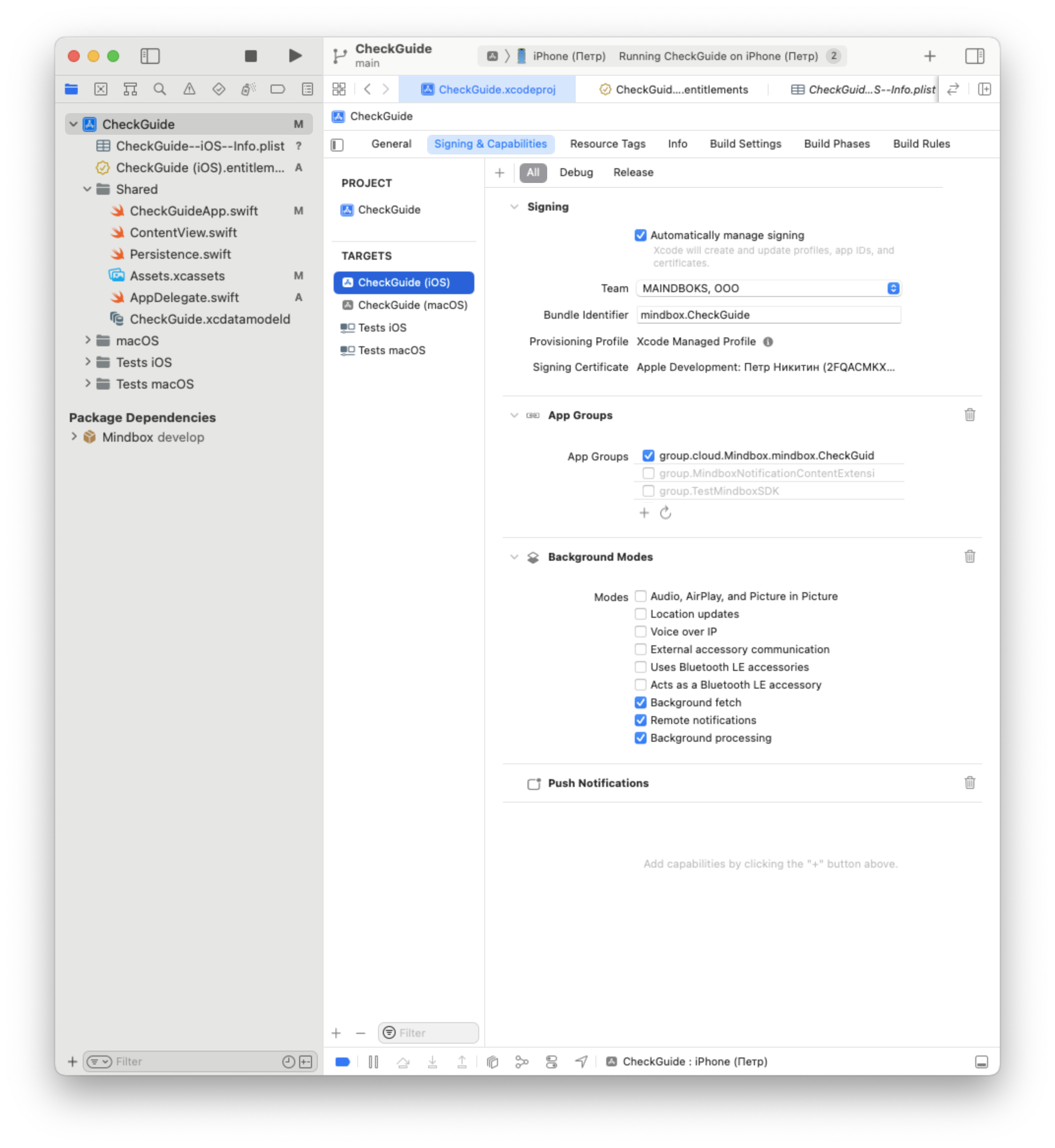
Откройте настройки проекта;
Выберите основной target;
Перейдите на вкладку Signing & Capabilities;
Нажмите на кнопку «добавить» и выберите Push Notifications и Background modes;
В разделе Background Modes поставьте 3 галки:
Background fetch;
Remote notifications;
Background processing.
Передайте менеджеру проекта ключи для подключения к Apple Push Notification service или добавьте ключи самостоятельно.
2. Настройка AppDelegate
Расширьте класс с помощью UNUserNotificationCenterDelegate
import UserNotifications import Mindbox import MindboxSdk @ UIApplicationMain class AppDelegate : UIResponder , UIApplicationDelegate , UNUserNotificationCenterDelegate { var window: UIWindow ? var bridge: RCTBridge ! ...
Сделайте начальную настройку
Зарегистрируйте устройство в APNS и подпишитесь на новый делегат, добавленный в 1 шаге.
... @ UIApplicationMain class AppDelegate : UIResponder , UIApplicationDelegate , UNUserNotificationCenterDelegate { var window: UIWindow ? var bridge: RCTBridge ! func application ( _ application: UIApplication, didFinishLaunchingWithOptions launchOptions: [ UIApplication.LaunchOptionsKey : Any ]? ) -> Bool { UIApplication. shared . registerForRemoteNotifications () UNUserNotificationCenter. current () . delegate = self return true } ...
Запросите разрешение на push-уведомления
Запросите разрешение у пользователя из JS-кода, например пакетом react-native-permissions. После ответа пользователя вызовите MindboxSdk.refreshNotificationPermissionStatus()
Пакету react-native-permissions нужно разрешение Notifications в Podfile: добавьте его по инструкции пакета , иначе запрос завершится ошибкой.
Метод refreshNotificationPermissionStatus доступен с версии пакета mindbox-sdk 2.14.5.
Отобразите стандартные уведомления
class AppDelegate : UIResponder , UIApplicationDelegate , UNUserNotificationCenterDelegate { ... func userNotificationCenter ( _ center: UNUserNotificationCenter, willPresent notification: UNNotification, withCompletionHandler completionHandler: @ escaping ( UNNotificationPresentationOptions ) -> Void ) { completionHandler ( [. alert , . sound , . badge ] ) } ...
Передайте пуш токен в Mindbox
class AppDelegate : UIResponder , UIApplicationDelegate , UNUserNotificationCenterDelegate { ... func application ( _ application: UIApplication, didRegisterForRemoteNotificationsWithDeviceToken deviceToken: Data ) { Mindbox. shared . apnsTokenUpdate ( deviceToken : deviceToken ) } }
Пример готового кода
import UserNotifications import Mindbox import MindboxSdk @ UIApplicationMain class AppDelegate : UIResponder , UIApplicationDelegate , UNUserNotificationCenterDelegate { var window: UIWindow ? var bridge: RCTBridge ! func application ( _ application: UIApplication, didFinishLaunchingWithOptions launchOptions: [ UIApplication.LaunchOptionsKey : Any ]? ) -> Bool { UIApplication. shared . registerForRemoteNotifications () UNUserNotificationCenter. current () . delegate = self return true } func userNotificationCenter ( _ center: UNUserNotificationCenter, willPresent notification: UNNotification, withCompletionHandler completionHandler: @ escaping ( UNNotificationPresentationOptions ) -> Void ) { completionHandler ( [. alert , . sound , . badge ] ) } func application ( _ application: UIApplication, didRegisterForRemoteNotificationsWithDeviceToken deviceToken: Data ) { Mindbox. shared . apnsTokenUpdate ( deviceToken : deviceToken ) } }
Если вы тестируете push-уведомления в окружении Sandbox, не забудьте поставить галочку "Тестовое сообщение Sandbox" в профиле рассылки "Вручную".Подробнее про Sandbox-окружение
Last modified on November 23, 2026